SMTP + IMAP + POP3 + Antispam + Antivirus
One of the official app stores for IceWhale products (CasaOS & ZimaOS), developed and maintained independently by BigBearTechWorld. This curated collection offers a wide range of carefully selected applications to enhance your CasaOS and ZimaOS experience.
master ← add-poste-io-docker-compose
opened 11:53PM - 28 Apr 25 UTC
- Added Poste.io configuration and Docker Compose files
- Poste.io provides a fu… ll-stack mail server solution with support for POP3, SMTP, IMAP, Spamassassin, WebMail, and WebAdmin
- Includes app metadata, container image, environment variables, volume mounts, and CasaOS-specific configuration
## Summary by CodeRabbit
- **New Features**
- Added support for deploying the Poste.io mail server via CasaOS with persistent storage, environment configuration, and automatic restart.
- Included detailed application metadata, UI assets, and installation guidance for streamlined setup and management within CasaOS.
Devid
December 11, 2025, 7:32pm
2
it uses port 80 which is the same as casaos port, anyway to fix it?
j900
December 12, 2025, 5:48pm
3
Hi @Devid and welcome here!
Sometimes app in casaOS/ZimaOS has collision of ports. It is due too many apps on one place…
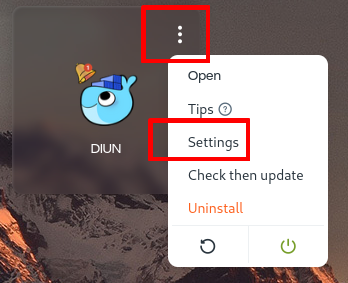
You can simply change any of ports when You 3 dots click (in casaOS) on Any App, choose (App) Settings . Change port(s) and save. It cause restart of App. It’s OK.
For example:
on Host side, port (http): 8050 mapped inside to the container to port 8080
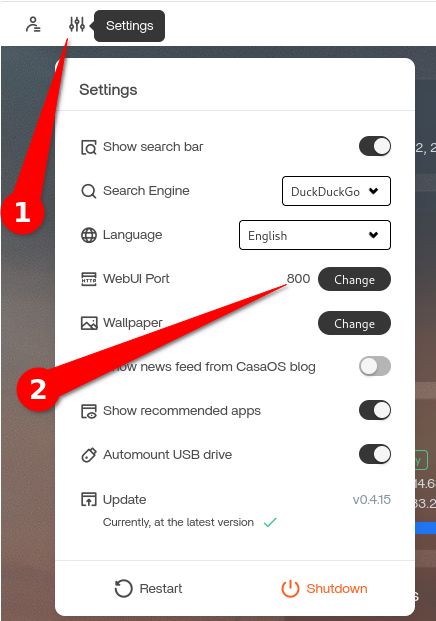
All apps can be changed this mentioned way. But casaOS frontend (web UI) can be changed only in this way. Click Settings and simply change port:
(only means there is no 3 dots App settings for casaOS)