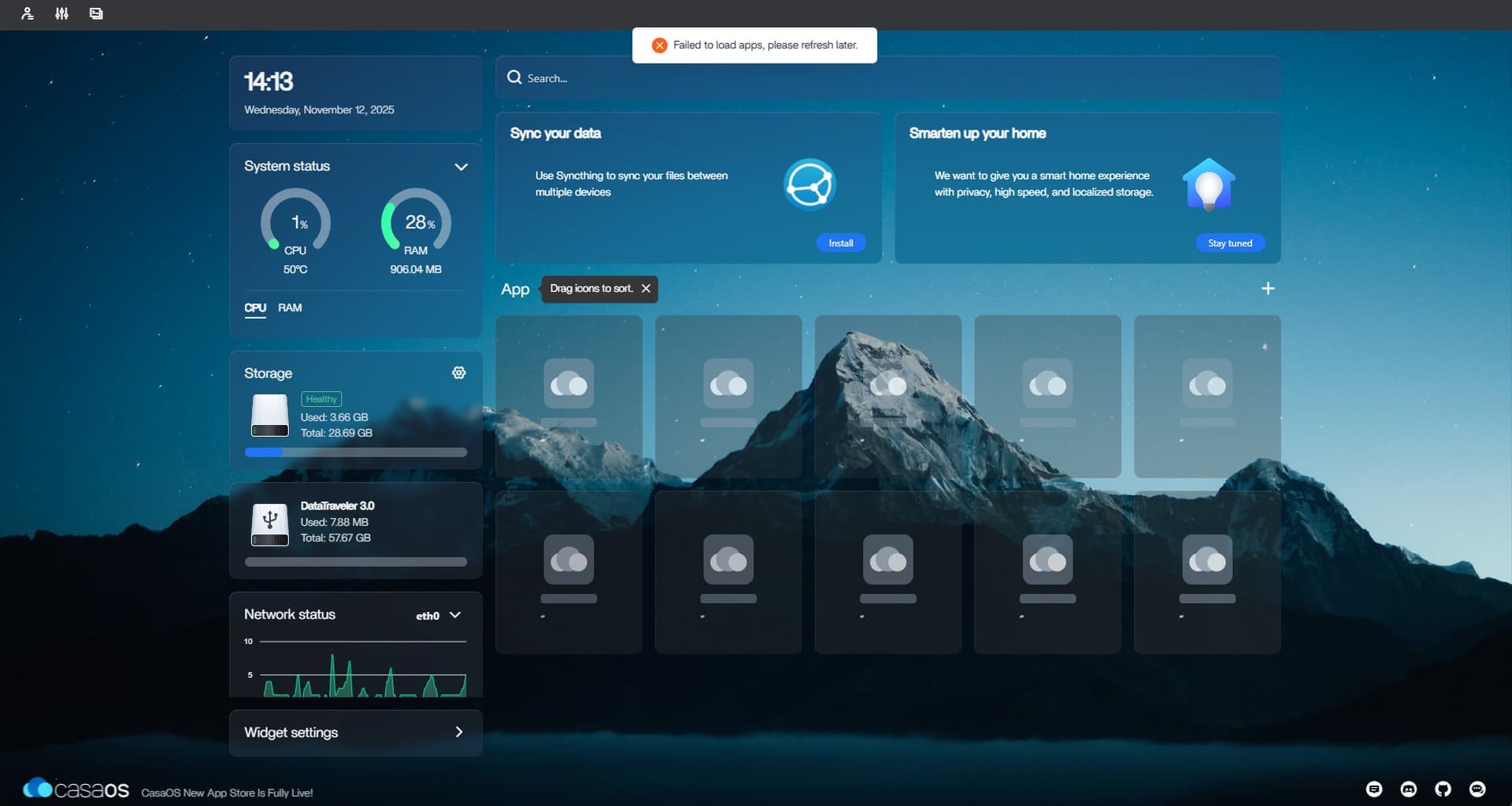
Fresh install of casaOS - Failed to load apps, please refresh later

Hello from Sweden!

I have this problem on 2 different devices. 1 RPi 5 8GB & 1 RPi 3 B+
Both with the same problem.

  1. written image to sd card - PiOS Lite 64bit
  2. apt update & upgrade
  3. curl installed
  4. run script: curl -fsSL https://get.casaos.io | sudo bash

It installs with no problems: ───────────────────────────────────────────────────── CasaOS v0.4.15 is running at: ───────────────────────────────────────────────────── - ``http://192.168.2.160`` (eth0) Open your browser and visit the above address.

  1. I create the user in the web interface

  2. Login i successful
    But every time i login to the dashboard i get the message: Failed to load apps, please refresh later

    1. Tried the healthcheck script
      Output:

``` ------------------- BigBearCasaOS Healthcheck V3.4 ------------------- Here are some links: https://community.bigbeartechworld.com ````` ```````` https://github.com/BigBearTechWorld` ``````` ```` If you would like to support me, please consider buying me a tea: https://ko-fi.com/bigbeartechworld`` ------------------- System Information: ------------------- Operating System: Debian GNU/Linux 13 (trixie) Kernel: 6.12.47+rpt-rpi-v8 Uptime: up 18 minutes Packages: 683 Shell: /bin/bash Terminal: xterm-256color CPU: Cortex-A53 GPU: Memory: 906Mi Total, 339Mi Used ------------------- CasaOS Healthcheck: ------------------- Local IP address: 192.168.2.160 Port number: 80 Access URL: http://192.168.2.160:80 UFW not installed, skipping firewall check. ------------------- Docker Container Port Check ------------------- :warning: UFW is not installed or not active. Skipping firewall check for Docker ports. ------------------- DNS Resolution Check: ------------------- Attempt 1 of 3 for docker.io using DNS server 8.8.8.8 failed Attempt 2 of 3 for docker.io using DNS server 8.8.8.8 failed Attempt 3 of 3 for docker.io using DNS server 8.8.8.8 failed Attempt 1 of 3 for docker.io using DNS server 1.1.1.1 failed Attempt 2 of 3 for docker.io using DNS server 1.1.1.1 failed Attempt 3 of 3 for docker.io using DNS server 1.1.1.1 failed Attempt 1 of 3 for docker.io using DNS server 9.9.9.9 failed Attempt 2 of 3 for docker.io using DNS server 9.9.9.9 failed Attempt 3 of 3 for docker.io using DNS server 9.9.9.9 failed Attempt 1 of 3 for docker.io using DNS server 208.67.222.222 failed Attempt 2 of 3 for docker.io using DNS server 208.67.222.222 failed Attempt 3 of 3 for docker.io using DNS server 208.67.222.222 failed ✗ DNS resolution for docker.io failed Debugging info for docker.io: environment: line 175: nslookup: command not found Attempt 1 of 3 for index.docker.io using DNS server 8.8.8.8 failed Attempt 2 of 3 for index.docker.io using DNS server 8.8.8.8 failed Attempt 3 of 3 for index.docker.io using DNS server 8.8.8.8 failed Attempt 1 of 3 for index.docker.io using DNS server 1.1.1.1 failed Attempt 2 of 3 for index.docker.io using DNS server 1.1.1.1 failed Attempt 3 of 3 for index.docker.io using DNS server 1.1.1.1 failed Attempt 1 of 3 for index.docker.io using DNS server 9.9.9.9 failed Attempt 2 of 3 for index.docker.io using DNS server 9.9.9.9 failed Attempt 3 of 3 for index.docker.io using DNS server 9.9.9.9 failed Attempt 1 of 3 for index.docker.io using DNS server 208.67.222.222 failed Attempt 2 of 3 for index.docker.io using DNS server 208.67.222.222 failed Attempt 3 of 3 for index.docker.io using DNS server 208.67.222.222 failed ✗ DNS resolution for index.docker.io failed Debugging info for index.docker.io: environment: line 175: nslookup: command not found Attempt 1 of 3 for registry-1.docker.io using DNS server 8.8.8.8 failed Attempt 2 of 3 for registry-1.docker.io using DNS server 8.8.8.8 failed Attempt 3 of 3 for registry-1.docker.io using DNS server 8.8.8.8 failed Attempt 1 of 3 for registry-1.docker.io using DNS server 1.1.1.1 failed Attempt 2 of 3 for registry-1.docker.io using DNS server 1.1.1.1 failed Attempt 3 of 3 for registry-1.docker.io using DNS server 1.1.1.1 failed Attempt 1 of 3 for registry-1.docker.io using DNS server 9.9.9.9 failed Attempt 2 of 3 for registry-1.docker.io using DNS server 9.9.9.9 failed Attempt 3 of 3 for registry-1.docker.io using DNS server 9.9.9.9 failed Attempt 1 of 3 for registry-1.docker.io using DNS server 208.67.222.222 failed Attempt 2 of 3 for registry-1.docker.io using DNS server 208.67.222.222 failed Attempt 3 of 3 for registry-1.docker.io using DNS server 208.67.222.222 failed ✗ DNS resolution for registry-1.docker.io failed Debugging info for registry-1.docker.io: environment: line 175: nslookup: command not found Attempt 1 of 3 for registry.hub.docker.com using DNS server 8.8.8.8 failed Attempt 2 of 3 for registry.hub.docker.com using DNS server 8.8.8.8 failed Attempt 3 of 3 for registry.hub.docker.com using DNS server 8.8.8.8 failed Attempt 1 of 3 for registry.hub.docker.com using DNS server 1.1.1.1 failed Attempt 2 of 3 for registry.hub.docker.com using DNS server 1.1.1.1 failed Attempt 3 of 3 for registry.hub.docker.com using DNS server 1.1.1.1 failed Attempt 1 of 3 for registry.hub.docker.com using DNS server 9.9.9.9 failed Attempt 2 of 3 for registry.hub.docker.com using DNS server 9.9.9.9 failed Attempt 3 of 3 for registry.hub.docker.com using DNS server 9.9.9.9 failed Attempt 1 of 3 for registry.hub.docker.com using DNS server 208.67.222.222 failed Attempt 2 of 3 for registry.hub.docker.com using DNS server 208.67.222.222 failed Attempt 3 of 3 for registry.hub.docker.com using DNS server 208.67.222.222 failed ✗ DNS resolution for registry.hub.docker.com failed Debugging info for registry.hub.docker.com: environment: line 175: nslookup: command not found Attempt 1 of 3 for gcr.io using DNS server 8.8.8.8 failed Attempt 2 of 3 for gcr.io using DNS server 8.8.8.8 failed Attempt 3 of 3 for gcr.io using DNS server 8.8.8.8 failed Attempt 1 of 3 for gcr.io using DNS server 1.1.1.1 failed Attempt 2 of 3 for gcr.io using DNS server 1.1.1.1 failed Attempt 3 of 3 for gcr.io using DNS server 1.1.1.1 failed Attempt 1 of 3 for gcr.io using DNS server 9.9.9.9 failed Attempt 2 of 3 for gcr.io using DNS server 9.9.9.9 failed Attempt 3 of 3 for gcr.io using DNS server 9.9.9.9 failed Attempt 1 of 3 for gcr.io using DNS server 208.67.222.222 failed Attempt 2 of 3 for gcr.io using DNS server 208.67.222.222 failed Attempt 3 of 3 for gcr.io using DNS server 208.67.222.222 failed ✗ DNS resolution for gcr.io failed Debugging info for gcr.io: environment: line 175: nslookup: command not found Attempt 1 of 3 for azurecr.io using DNS server 8.8.8.8 failed Attempt 2 of 3 for azurecr.io using DNS server 8.8.8.8 failed Attempt 3 of 3 for azurecr.io using DNS server 8.8.8.8 failed Attempt 1 of 3 for azurecr.io using DNS server 1.1.1.1 failed Attempt 2 of 3 for azurecr.io using DNS server 1.1.1.1 failed Attempt 3 of 3 for azurecr.io using DNS server 1.1.1.1 failed Attempt 1 of 3 for azurecr.io using DNS server 9.9.9.9 failed Attempt 2 of 3 for azurecr.io using DNS server 9.9.9.9 failed Attempt 3 of 3 for azurecr.io using DNS server 9.9.9.9 failed Attempt 1 of 3 for azurecr.io using DNS server 208.67.222.222 failed Attempt 2 of 3 for azurecr.io using DNS server 208.67.222.222 failed Attempt 3 of 3 for azurecr.io using DNS server 208.67.222.222 failed ✗ DNS resolution for azurecr.io failed Debugging info for azurecr.io: environment: line 175: nslookup: command not found Attempt 1 of 3 for ghcr.io using DNS server 8.8.8.8 failed Attempt 2 of 3 for ghcr.io using DNS server 8.8.8.8 failed Attempt 3 of 3 for ghcr.io using DNS server 8.8.8.8 failed Attempt 1 of 3 for ghcr.io using DNS server 1.1.1.1 failed Attempt 2 of 3 for ghcr.io using DNS server 1.1.1.1 failed Attempt 3 of 3 for ghcr.io using DNS server 1.1.1.1 failed Attempt 1 of 3 for ghcr.io using DNS server 9.9.9.9 failed Attempt 2 of 3 for ghcr.io using DNS server 9.9.9.9 failed Attempt 3 of 3 for ghcr.io using DNS server 9.9.9.9 failed Attempt 1 of 3 for ghcr.io using DNS server 208.67.222.222 failed Attempt 2 of 3 for ghcr.io using DNS server 208.67.222.222 failed Attempt 3 of 3 for ghcr.io using DNS server 208.67.222.222 failed ✗ DNS resolution for ghcr.io failed Debugging info for ghcr.io: environment: line 175: nslookup: command not found Attempt 1 of 3 for registry.gitlab.com using DNS server 8.8.8.8 failed Attempt 2 of 3 for registry.gitlab.com using DNS server 8.8.8.8 failed Attempt 3 of 3 for registry.gitlab.com using DNS server 8.8.8.8 failed Attempt 1 of 3 for registry.gitlab.com using DNS server 1.1.1.1 failed Attempt 2 of 3 for registry.gitlab.com using DNS server 1.1.1.1 failed Attempt 3 of 3 for registry.gitlab.com using DNS server 1.1.1.1 failed Attempt 1 of 3 for registry.gitlab.com using DNS server 9.9.9.9 failed Attempt 2 of 3 for registry.gitlab.com using DNS server 9.9.9.9 failed Attempt 3 of 3 for registry.gitlab.com using DNS server 9.9.9.9 failed Attempt 1 of 3 for registry.gitlab.com using DNS server 208.67.222.222 failed Attempt 2 of 3 for registry.gitlab.com using DNS server 208.67.222.222 failed Attempt 3 of 3 for registry.gitlab.com using DNS server 208.67.222.222 failed ✗ DNS resolution for registry.gitlab.com failed Debugging info for registry.gitlab.com```` : environment: line 175: nslookup: command not found ------------------- Service Status Check: ------------------- ✓ casaos-app-management.service is running ✓ casaos-gateway.service is running ✓ casaos-local-storage.service is running ✓ casaos-message-bus.service is running ✓ casaos-user-service.service is running ✓ casaos.service is running ------------------- Service Logs (last 50 lines): ------------------- ✓ No errors found in service logs ------------------- Docker Status Check ------------------- ✓ Docker is running ------------------- ------------------- Security Audit Check ------------------- ✗ Root SSH login enabled ✗ SSH password authentication enabled Open ports: tcp 0 0 0.0.0.0:139 0.0.0.0:* LISTEN tcp 0 0 127.0.0.1:40531 0.0.0.0:* LISTEN tcp 0 0 0.0.0.0:22 0.0.0.0:* LISTEN tcp 0 0 127.0.0.1:44819 0.0.0.0:* LISTEN tcp 0 0 127.0.0.1:43779 0.0.0.0:* LISTEN tcp 0 0 0.0.0.0:445 0.0.0.0:* LISTEN tcp 0 0 127.0.0.1:45467 0.0.0.0:* LISTEN tcp 0 0 127.0.0.1:38801 0.0.0.0:* LISTEN tcp 0 0 127.0.0.1:38795 0.0.0.0:* LISTEN tcp 0 0 127.0.0.1:41447 0.0.0.0:* LISTEN tcp6 0 0 :::139 :::* LISTEN tcp6 0 0 :::80 :::* LISTEN tcp6 0 0 :::22 :::* LISTEN tcp6 0 0 :::445 :::* LISTEN ------------------- Memory Pressure Check ------------------- Swap Configuration: ✓ Swap usage: 0% Swappiness value: 60 ------------------- System Resource Limits Check ------------------- File descriptor limit: 1024 Max user processes: 2547 ⚠ Low file descriptor limit ⚠ Low process limit ------------------- Docker Container Health Check ------------------- ------------------- Health Check Summary Report ------------------- ✓ No significant issues found ------------------- Health Check Complete -------------------` ```

Can anyone tell me whats wrong?
I’ve been at this for way to long and don’t know what to do.
Tried installing from scratch 7 different times on different devices and also tried different locations such as at home and also at work.

Thinking this is a DNS problem but not shure. Please help me :slight_smile:

Hello @Kevin_Oscarson, welcome here in forum.

sudo apt update
sudo apt install dnsutils

Try to this, because script expects nslookup util.

Yes, it looks like DNS problem.

Thank you! @j900

Unfortunately this did not get rid of the error message “Failed to load apps, please refresh later“ on the dashboard. No apps or appstore visible.

Thou I think it helped with some of the DNS errors? I’m also not at all familiar with linux.
Pasting healthcheck down below:

-------------------
BigBearCasaOS Healthcheck V3.4
-------------------
Here are some links:
https://community.bigbeartechworld.com
https://github.com/BigBearTechWorld

If you would like to support me, please consider buying me a tea:
https://ko-fi.com/bigbeartechworld

-------------------
System Information:
-------------------
Operating System: Debian GNU/Linux 13 (trixie)
Kernel: 6.12.47+rpt-rpi-2712
Uptime: up 7 minutes
Packages: 692
Shell: /bin/bash
Terminal: xterm-256color
CPU: Cortex-A76
GPU:
Memory: 7.9Gi Total, 894Mi Used

-------------------
CasaOS Healthcheck:
-------------------
Local IP address: 192.168.1.2
Port number: 80
Access URL: http://192.168.1.2:80
UFW not installed, skipping firewall check.
-------------------
Docker Container Port Check
-------------------
⚠ UFW is not installed or not active. Skipping firewall check for Docker ports.
-------------------
DNS Resolution Check:
-------------------
✓ DNS resolution for docker.io is successful using DNS server 8.8.8.8
✓ DNS resolution for index.docker.io is successful using DNS server 8.8.8.8
✓ DNS resolution for registry-1.docker.io is successful using DNS server 8.8.8.8
✓ DNS resolution for registry.hub.docker.com is successful using DNS server 8.8.8.8
✓ DNS resolution for gcr.io is successful using DNS server 8.8.8.8
✓ DNS resolution for azurecr.io is successful using DNS server 8.8.8.8
✓ DNS resolution for ghcr.io is successful using DNS server 8.8.8.8
✓ DNS resolution for registry.gitlab.com is successful using DNS server 8.8.8.8
-------------------
Service Status Check:
-------------------
✓ casaos-app-management.service is running
✓ casaos-gateway.service is running
✓ casaos-local-storage.service is running
✓ casaos-message-bus.service is running
✓ casaos-user-service.service is running
✓ casaos.service is running

-------------------
Service Logs (last 50 lines):
-------------------
✓ No errors found in service logs
-------------------
Docker Status Check
-------------------
✓ Docker is running
-------------------
Storage Health Check
-------------------
✓ /dev/sda is healthy
⚠ Unable to check health of /dev/mmcblk0
⚠ Unable to check health of /dev/zram0
-------------------
Disk Space Check
-------------------
✓ Disk usage is at 18%, which is below the threshold of 80%
-------------------
CPU Load Check
-------------------
✓ CPU load is acceptable: 0.28 (Threshold: 2.8)
-------------------
Memory Usage Check
-------------------
✓ Memory usage is acceptable: 905MB used of 8063MB (Threshold: 6450MB)
-------------------
System Temperature Check
-------------------
✓ Temperature is normal: 47.4°C
-------------------
System Update Check
-------------------
✓ System updates available: 0 upgraded, 0 newly installed, 0 to remove and 0 not upgraded.
-------------------
DMESG Error Check
-------------------
✓ No critical errors found in dmesg logs
-------------------
Process Resource Check
-------------------
Top 5 CPU consuming processes:
/usr/bin/casaos-app-management   5.9%
/sbin/init             1.9%
/usr/libexec/samba/rpcd_lsad   1.8%
/usr/libexec/samba/rpcd_lsad   1.4%
/usr/bin/casaos-gateway   1.1%

Top 5 Memory consuming processes:
/usr/bin/casaos-app-management   1.0%
/usr/bin/dockerd       0.9%
/usr/bin/casaos-local-storage   0.6%
/usr/bin/rclone        0.5%
/usr/bin/containerd    0.5%
✗ Found 5 zombie processes
-------------------
Network Interface Check
-------------------
✓ Interface eth0 is UP
Speed: 100Mb/s
⚠ eth0 has bytes
bytes errors and  drops
✗ Interface wlan0 is DOWN
⚠ wlan0 has bytes
bytes errors and  drops
✗ Interface docker0 is DOWN
⚠ docker0 has bytes
bytes errors and  drops
-------------------
Network Latency Check
-------------------
✓ Good latency to 8.8.8.8: 30.847ms
✓ Good latency to 1.1.1.1: 47.709ms
✓ Good latency to google.com: 35.764ms
-------------------
File System Health Check
-------------------
✓ Inode usage on udev: 1%
✓ Inode usage on tmpfs: 1%
✓ Inode usage on /dev/mmcblk0p2: 5%
✓ Inode usage on tmpfs: 1%
✓ Inode usage on /dev/sda2: 1%
✓ Mount point / is writable
-------------------
Time Synchronization Check
-------------------
✗ NTP is not synchronized
System time status:
               Local time: Wed 2025-11-12 21:16:46 CET
           Universal time: Wed 2025-11-12 20:16:46 UTC
                 RTC time: Wed 2025-11-12 20:16:46
                Time zone: Europe/Stockholm (CET, +0100)
System clock synchronized: yes
              NTP service: active
          RTC in local TZ: no
-------------------
Log Rotation Check
-------------------
Checking logs in /var/log:
Checking logs in /var/log/casaos:
⚠ No CasaOS log rotation configuration found
-------------------
Security Audit Check
-------------------
✗ Root SSH login enabled
✗ SSH password authentication enabled
Open ports:
tcp        0      0 127.0.0.1:46019         0.0.0.0:*               LISTEN
tcp        0      0 127.0.0.1:33649         0.0.0.0:*               LISTEN
tcp        0      0 127.0.0.1:32947         0.0.0.0:*               LISTEN
tcp        0      0 0.0.0.0:139             0.0.0.0:*               LISTEN
tcp        0      0 0.0.0.0:22              0.0.0.0:*               LISTEN
tcp        0      0 0.0.0.0:445             0.0.0.0:*               LISTEN
tcp        0      0 127.0.0.1:33033         0.0.0.0:*               LISTEN
tcp        0      0 127.0.0.1:38023         0.0.0.0:*               LISTEN
tcp        0      0 127.0.0.1:44703         0.0.0.0:*               LISTEN
tcp        0      0 127.0.0.1:36675         0.0.0.0:*               LISTEN
tcp6       0      0 :::139                  :::*                    LISTEN
tcp6       0      0 :::80                   :::*                    LISTEN
tcp6       0      0 :::22                   :::*                    LISTEN
tcp6       0      0 :::445                  :::*                    LISTEN
-------------------
Memory Pressure Check
-------------------
Swap Configuration:
✓ Swap usage: 0%
Swappiness value: 60
-------------------
System Resource Limits Check
-------------------
File descriptor limit: 1024
Max user processes: 31928
⚠ Low file descriptor limit
-------------------
Docker Container Health Check
-------------------
-------------------
Health Check Summary Report
-------------------
✓ No significant issues found
-------------------
Health Check Complete
-------------------

Please help!
No other settings has been made. Only reserved IP address in my Ubiquiti CGU.

Hello @Kevin_Oscarson,

Have you tried the big-bear-script I made?

1 Like

@dragonfire1119 , When running the script i get the error message: ERROR: Docker installation/configuration failed. Failed to start docker. Unit docker.service not found.

Any advice? :slightly_smiling_face:

Step 1: Checking system… Detected OS: debian trixie Step 1a: Checking for Snap Docker installation… Checking for Docker installed via Snap… Snap is not installed on this system Step 1b: Checking for multiple Docker binaries… Checking for Docker binary locations… ========================================== WARNING: Multiple Docker binaries found! ========================================== /usr/bin/docker /bin/docker This may cause version conflicts. After installation, verify which binary is being used with: which docker Step 2: Checking for CasaOS… CasaOS is installed: v0.4.15 Step 2a: Checking environment… Running on standard system (not LXC) Step 3: Displaying current Docker versions… Current Docker versions: Client: Docker Engine - Community Version: 29.0.0 API version: 1.52 Go version: go1.25.4 Git commit: 3d4129b Built: Mon Nov 10 21:47:04 2025 OS/Arch: linux/arm64 Context: default Server: Docker Engine - Community Engine: Version: 29.0.0 API version: 1.52 (minimum version 1.44) Go version: go1.25.4 Git commit: d105562 Built: Mon Nov 10 21:47:04 2025 OS/Arch: linux/arm64 Experimental: false containerd: Version: v2.1.5 GitCommit: fcd43222d6b07379a4be9786bda52438f0dd16a1 runc: Version: 1.3.3 GitCommit: v1.3.3-0-gd842d771 docker-init: Version: 0.19.0 GitCommit: de40ad0 Installed Docker packages: containerd.io 2.1.5-1~debian.13~trixie docker-ce 5:29.0.0-1~debian.13~trixie docker-ce-cli 5:29.0.0-1~debian.13~trixie docker-ce-rootless-extras 5:29.0.0-1~debian.13~trixie Step 3a: Checking current Docker API version… Current Docker API version: 1.52 Step 4: Stopping CasaOS services (if installed)… Stopping CasaOS services… Stopping casaos-gateway.service… Stopping casaos-message-bus.service… Stopping casaos-local-storage.service… Stopping casaos-app-management.service… Stopping casaos.service… Step 5: Removing standalone docker-compose if present… Step 6: Cleaning Docker state and fixing permissions… Cleaning Docker runtime state… Stopping Docker service… Stopping ‘docker.service’, but its triggering units are still active: docker.socket Stopping Docker socket… Checking for lingering Docker processes… Cleaning Docker sockets and pids… Cleaning containerd runtime state… Cleaning stale container pids… Docker runtime cleanup complete Docker will set its own directory permissions on startup Step 7: Installing Docker version compatible with CasaOS… Setting up Docker repository… Hit:1 http://deb.debian.org/debian trixie InRelease Hit:2 http://archive.raspberrypi.com/debian trixie InRelease Get:3 http://deb.debian.org/debian trixie-updates InRelease [47.3 kB] Get:4 https://download.docker.com/linux/debian trixie InRelease [32.5 kB] Get:5 http://deb.debian.org/debian-security trixie-security InRelease [43.4 kB] Get:6 http://deb.debian.org/debian-security trixie-security/main armhf Packages [67.2 kB] Get:7 http://deb.debian.org/debian-security trixie-security/main arm64 Packages [70.4 kB] Fetched 261 kB in 1s (454 kB/s) Reading package lists… Done Installing prerequisites… Reading package lists… Done Building dependency tree… Done Reading state information… Done ca-certificates is already the newest version (20250419). curl is already the newest version (8.14.1-2). gnupg is already the newest version (2.4.7-21). gnupg set to manually installed. lsb-release is already the newest version (12.1-1). lsb-release set to manually installed. The following package was automatically installed and is no longer required: libyuv0 Use ‘sudo apt autoremove’ to remove it. The following NEW packages will be installed: apt-transport-https 0 upgraded, 1 newly installed, 0 to remove and 0 not upgraded. Need to get 38.6 kB of archives. After this operation, 49.2 kB of additional disk space will be used. Get:1 http://deb.debian.org/debian trixie/main arm64 apt-transport-https all 3.0.3 [38.6 kB] Fetched 38.6 kB in 0s (378 kB/s) Selecting previously unselected package apt-transport-https. (Reading database … 69432 files and directories currently installed.) Preparing to unpack …/apt-transport-https_3.0.3_all.deb … Unpacking apt-transport-https (3.0.3) … Setting up apt-transport-https (3.0.3) … Adding Docker’s official GPG key… Setting up Docker repository… Updating package lists with Docker repository… Hit:1 http://deb.debian.org/debian trixie InRelease Hit:2 http://archive.raspberrypi.com/debian trixie InRelease Hit:3 http://deb.debian.org/debian trixie-updates InRelease Hit:4 https://download.docker.com/linux/debian trixie InRelease Hit:5 http://deb.debian.org/debian-security trixie-security InRelease Reading package lists… Done Available Docker CE versions: docker-ce | 5:29.0.0-1~debian.13~trixie | https://download.docker.com/linux/debian trixie/stable arm64 Packages docker-ce | 5:28.5.2-1~debian.13~trixie | https://download.docker.com/linux/debian trixie/stable arm64 Packages docker-ce | 5:28.5.1-1~debian.13~trixie | https://download.docker.com/linux/debian trixie/stable arm64 Packages docker-ce | 5:28.5.0-1~debian.13~trixie | https://download.docker.com/linux/debian trixie/stable arm64 Packages docker-ce | 5:28.4.0-1~debian.13~trixie | https://download.docker.com/linux/debian trixie/stable arm64 Packages Configuring Docker packages to prevent auto-upgrade… docker-ce was already not on hold. docker-ce-cli was already not on hold. containerd.io was already not on hold. docker-buildx-plugin was already not on hold. docker-compose-plugin was already not on hold. Removing existing Docker packages to ensure clean installation… Stopping Docker services before package removal… Reading package lists… Done Building dependency tree… Done Reading state information… Done The following packages were automatically installed and are no longer required: libyuv0 pigz Use ‘sudo apt autoremove’ to remove them. The following packages will be REMOVED: containerd.io docker-buildx-plugin docker-ce docker-ce-cli docker-compose-plugin 0 upgraded, 0 newly installed, 5 to remove and 0 not upgraded. After this operation, 366 MB disk space will be freed. (Reading database … 69436 files and directories currently installed.) Removing docker-ce (5:29.0.0-1~debian.13~trixie) … Removing containerd.io (2.1.5-1~debian.13~trixie) … Removing docker-buildx-plugin (0.29.1-1~debian.13~trixie) … Removing docker-ce-cli (5:29.0.0-1~debian.13~trixie) … Removing docker-compose-plugin (2.40.3-1~debian.13~trixie) … Processing triggers for man-db (2.13.1-1) … Installing Docker version compatible with CasaOS (24.0.7)… Installing docker-ce-cli=5:24.0.7-1~debian~trixie Installing docker-ce=5:24.0.7-1~debian~trixie Installing containerd.io=1.7.28-1~debian~trixie Reading package lists… Done Building dependency tree… Done Reading state information… Done Package docker-ce is not available, but is referred to by another package. This may mean that the package is missing, has been obsoleted, or is only available from another source However the following packages replace it: docker-ce-cli Package docker-ce-cli is not available, but is referred to by another package. This may mean that the package is missing, has been obsoleted, or is only available from another source However the following packages replace it: docker-ce docker-buildx-plugin Package containerd.io is not available, but is referred to by another package. This may mean that the package is missing, has been obsoleted, or is only available from another source E: Version ‘5:24.0.7-1~debian~trixie’ for ‘docker-ce-cli’ was not found E: Version ‘5:24.0.7-1~debian~trixie’ for ‘docker-ce’ was not found E: Version ‘1.7.28-1~debian~trixie’ for ‘containerd.io’ was not found Specific version installation failed. Trying alternative method… Reading package lists… Done Building dependency tree… Done Reading state information… Done Package docker-ce is not available, but is referred to by another package. This may mean that the package is missing, has been obsoleted, or is only available from another source However the following packages replace it: docker-ce-cli Package docker-ce-cli is not available, but is referred to by another package. This may mean that the package is missing, has been obsoleted, or is only available from another source However the following packages replace it: docker-ce docker-buildx-plugin Package containerd.io is not available, but is referred to by another package. This may mean that the package is missing, has been obsoleted, or is only available from another source E: Version ‘5:24.0.*’ for ‘docker-ce’ was not found E: Version '5:24.0.*’ for ‘docker-ce-cli’ was not found E: Version ‘1.7.28-1~debian~trixie’ for ‘containerd.io’ was not found Trying with containerd.io version pattern… Reading package lists… Done Building dependency tree… Done Reading state information… Done Package docker-ce is not available, but is referred to by another package. This may mean that the package is missing, has been obsoleted, or is only available from another source However the following packages replace it: docker-ce-cli Package docker-ce-cli is not available, but is referred to by another package. This may mean that the package is missing, has been obsoleted, or is only available from another source However the following packages replace it: docker-ce docker-buildx-plugin E: Version ‘5:24.0.*’ for ‘docker-ce’ was not found E: Version '5:24.0.*`` ’ for ‘docker-ce-cli’ was not found ERROR: All installation methods failed! Please check your internet connection and try again. ========================================== ERROR: Docker installation/configuration failed ========================================== Attempting to start Docker… Failed to start docker.service: Unit docker.service not found. Could not start Docker. Please check the error messages above. ``

Tried again and the script seemed to finish. However the API version is still 1.52?

CasaOS Docker Fix Complete! ========================================== Docker has been set to version 24.0.7 (compatible with CasaOS) Docker packages have been held to prevent automatic upgrades. To allow Docker to be upgraded in the future, run: sudo apt-mark unhold docker-ce docker-ce-cli ``containerd.io`` If you found this helpful, please consider supporting BigBear: ``https://ko-fi.com/bigbeartechworld`` The Docker client version error should now be resolved. You can now run your Docker commands without API version issues. ⚠ Docker API version unchanged: 1.52 This may indicate the downgrade didn’t take effect. Please review the troubleshooting steps above. admin@casaos:~ $ dockerd --version Docker version 29.0.0, build d105562 admin@casaos:~ $ sudo systemctl stop docker Stopping ‘docker.service’, but its triggering units are still active: docker.socket admin@casaos:~ $ sudo pkill -9 dockerd admin@casaos:~ $ sudo systemctl start docker admin@casaos:~ $ docker version Client: Docker Engine - Community Version: 29.0.0 API version: 1.52 Go version: go1.25.4 Git commit: 3d4129b Built: Mon Nov 10 21:47:04 2025 OS/Arch: linux/arm64 Context: default permission denied while trying to connect to the docker API at unix:///var/run/docker.sock admin@casaos:~ $ which -a docker /usr/bin/docker /bin/docker admin@casaos:~ $ which -a dockerd /usr/bin/dockerd /bin/dockerd admin@casaos:~ $ dpkg -l | grep docker-ce ii docker-ce 5:29.0.0-1~debian.13~trixie arm64 Docker: the open-source application container engine ii docker-ce-cli 5:29.0.0-1~debian.13~trixie arm64 Docker CLI: the open-source application container engine ii docker-ce-rootless-extras 5:29.0.0-1~debian.13~trixie arm64 Rootless support for Docker. admin@casaos:~ $ sudo journalctl -u docker --no-pager -n 50 Nov 13 09:50:23 casaos dockerd[3236]: time=“2025-11-13T09:50:23.758623478+01:00” level=info msg=“Daemon shutdown complete” Nov 13 09:50:23 casaos systemd[1]: docker.service: Deactivated successfully. Nov 13 09:50:23 casaos systemd[1]: Stopped docker.service - Docker Application Container Engine. Nov 13 09:50:26 casaos systemd[1]: Starting docker.service - Docker Application Container Engine… Nov 13 09:50:26 casaos dockerd[3866]: time=“2025-11-13T09:50:26.106415633+01:00” level=info msg=“Starting up” Nov 13 09:50:26 casaos dockerd[3866]: time=“2025-11-13T09:50:26.106981278+01:00” level=info msg="OTEL tracing is not configured, using no-op tracer provider"Nov 13 09:50:26 casaos dockerd[3866]: time=“2025-11-13T09:50:26.107113537+01:00” level=info msg=“CDI directory does not exist, skipping: failed to monitor for changes: no such file or directory” dir=/var/run/cdi Nov 13 09:50:26 casaos dockerd[3866]: time=“2025-11-13T09:50:26.107129777+01:00” level=info msg=“CDI directory does not exist, skipping: failed to monitor for changes: no such file or directory” dir=/etc/cdi Nov 13 09:50:26 casaos dockerd[3866]: time=“2025-11-13T09:50:26.115360028+01:00” level=info msg=“Creating a containerd client” address=/run/containerd/containerd.sock timeout=1m0s Nov 13 09:50:26 casaos dockerd[3866]: time=“2025-11-13T09:50:26.128763953+01:00” level=info msg=“Loading containers: start.” Nov 13 09:50:26 casaos dockerd[3866]: time=“2025-11-13T09:50:26.129754633+01:00” level=info msg=“Starting daemon with containerd snapshotter integration enabled” Nov 13 09:50:26 casaos dockerd[3866]: time=“2025-11-13T09:50:26.131222180+01:00” level=info msg=“Restoring containers: start.” Nov 13 09:50:26 casaos dockerd[3866]: time=“2025-11-13T09:50:26.132480210+01:00” level=warning msg=“failed to determine if container is already mounted” container=da2819cbda6967b0352c3feebde6216d8d67d58f21834a38056fcf5edfb5bee7 Nov 13 09:50:26 casaos dockerd[3866]: time=“2025-11-13T09:50:26.132546710+01:00” level=warning msg=“failed to determine if container is already mounted” container=d7a10f830a6865fc1ed7279f863842148711b05a482dd72830bc54a02c5000fc Nov 13 09:50:26 casaos dockerd[3866]: time=“2025-11-13T09:50:26.204658550+01:00” level=info msg=“Deleting nftables IPv4 rules” error=“exit status 1” Nov 13 09:50:26 casaos dockerd[3866]: time=“2025-11-13T09:50:26.220757497+01:00” level=info msg=“Deleting nftables IPv6 rules” error=“exit status 1” Nov 13 09:50:27 casaos dockerd[3866]: time=“2025-11-13T09:50:27.088523633+01:00” level=info msg=“Loading containers: done.” Nov 13 09:50:27 casaos dockerd[3866]: time=“2025-11-13T09:50:27.094799339+01:00” level=warning msg=“WARNING: No memory limit support” Nov 13 09:50:27 casaos dockerd[3866]: time=“2025-11-13T09:50:27.094828820+01:00” level=warning msg=“WARNING: No swap limit support” Nov 13 09:50:27 casaos dockerd[3866]: time=“2025-11-13T09:50:27.094858283+01:00” level=info msg=“Docker daemon” commit=d105562 containerd-snapshotter=true storage-driver=overlayfs version=29.0.0 Nov 13 09:50:27 casaos dockerd[3866]: time=“2025-11-13T09:50:27.094902801+01:00” level=info msg=“Initializing buildkit” Nov 13 09:50:27 casaos dockerd[3866]: time=“2025-11-13T09:50:27.098678780+01:00” level=info msg=“Completed buildkit initialization” Nov 13 09:50:27 casaos dockerd[3866]: time=“2025-11-13T09:50:27.105743370+01:00” level=info msg=“Daemon has completed initialization” Nov 13 09:50:27 casaos dockerd[3866]: time=“2025-11-13T09:50:27.105803944+01:00” level=info msg=“API listen on /run/docker.sock” Nov 13 09:50:27 casaos systemd[1]: Started docker.service - Docker Application Container Engine. Nov 13 09:50:33 casaos systemd[1]: docker.service: Main process exited, code=killed, status=9/KILL Nov 13 09:50:33 casaos systemd[1]: docker.service: Failed with result ‘signal’. Nov 13 09:50:35 casaos systemd[1]: docker.service: Scheduled restart job, restart counter is at 1. Nov 13 09:50:35 casaos systemd[1]: Starting docker.service - Docker Application Container Engine… Nov 13 09:50:35 casaos dockerd[4078]: time=“2025-11-13T09:50:35.469895876+01:00” level=info msg=“Starting up” Nov 13 09:50:35 casaos dockerd[4078]: time=“2025-11-13T09:50:35.470493521+01:00” level=info msg="OTEL tracing is not configured, using no-op tracer provider"Nov 13 09:50:35 casaos dockerd[4078]: time=“2025-11-13T09:50:35.470588242+01:00” level=info msg=“CDI directory does not exist, skipping: failed to monitor for changes: no such file or directory” dir=/var/run/cdi Nov 13 09:50:35 casaos dockerd[4078]: time=“2025-11-13T09:50:35.470607057+01:00” level=info msg=“CDI directory does not exist, skipping: failed to monitor for changes: no such file or directory” dir=/etc/cdi Nov 13 09:50:35 casaos dockerd[4078]: time=“2025-11-13T09:50:35.480283853+01:00” level=info msg=“Creating a containerd client” address=/run/containerd/containerd.sock timeout=1m0s Nov 13 09:50:35 casaos dockerd[4078]: time=“2025-11-13T09:50:35.488138642+01:00” level=info msg=“Loading containers: start.” Nov 13 09:50:35 casaos dockerd[4078]: time=“2025-11-13T09:50:35.491041088+01:00” level=info msg=“Starting daemon with containerd snapshotter integration enabled” Nov 13 09:50:35 casaos dockerd[4078]: time=“2025-11-13T09:50:35.492516913+01:00” level=info msg=“Restoring containers: start.” Nov 13 09:50:35 casaos dockerd[4078]: time=“2025-11-13T09:50:35.493661239+01:00” level=warning msg=“failed to determine if container is already mounted” container=da2819cbda6967b0352c3feebde6216d8d67d58f21834a38056fcf5edfb5bee7 Nov 13 09:50:35 casaos dockerd[4078]: time=“2025-11-13T09:50:35.494388050+01:00” level=warning msg=“failed to determine if container is already mounted” container=d7a10f830a6865fc1ed7279f863842148711b05a482dd72830bc54a02c5000fc Nov 13 09:50:35 casaos dockerd[4078]: time=“2025-11-13T09:50:35.560687984+01:00” level=info msg=“Deleting nftables IPv4 rules” error=“exit status 1” Nov 13 09:50:35 casaos dockerd[4078]: time=“2025-11-13T09:50:35.592716689+01:00” level=info msg=“Deleting nftables IPv6 rules” error=“exit status 1” Nov 13 09:50:36 casaos dockerd[4078]: time=“2025-11-13T09:50:36.449263138+01:00” level=info msg=“Loading containers: done.” Nov 13 09:50:36 casaos dockerd[4078]: time=“2025-11-13T09:50:36.455534039+01:00” level=warning msg=“WARNING: No memory limit support” Nov 13 09:50:36 casaos dockerd[4078]: time=“2025-11-13T09:50:36.455564074+01:00” level=warning msg=“WARNING: No swap limit support” Nov 13 09:50:36 casaos dockerd[4078]: time=“2025-11-13T09:50:36.455593924+01:00” level=info msg=“Docker daemon” commit=d105562 containerd-snapshotter=true storage-driver=overlayfs version=29.0.0 Nov 13 09:50:36 casaos dockerd[4078]: time=“2025-11-13T09:50:36.455639087+01:00” level=info msg=“Initializing buildkit” Nov 13 09:50:36 casaos dockerd[4078]: time=“2025-11-13T09:50:36.459739323+01:00” level=info msg=“Completed buildkit initialization” Nov 13 09:50:36 casaos dockerd[4078]: time=“2025-11-13T09:50:36.466829630+01:00” level=info msg=“Daemon has completed initialization” Nov 13 09:50:36 casaos dockerd[4078]: time=“2025-11-13T09:50:36.466897903+01:00” level=info msg=“API listen on /run/docker.sock” Nov 13 09:50:36 casaos systemd[1]: Started docker.service - Docker Application Container Engine.