I have the BigBear Nextcloud docker container installed and setup on my NAS running Zima OS. On the Nextcloud dashboard which I’m accessing through the web GUI, the files and folders displayed are those within the Nextcloud container and which are included with Nextcloud, such as the setup guide. These are somewhere on /ZimaOS-HD; I don’t fully understand how paths on the host system translate to locations inside a docker container. But my personal files and folders are located on a secondary storage location (a Raid pool of drives), /Main-Storage. Can anyone give me tips on how to display my files and folders located on /Main-Storage on the Nextcloud dashboard (under files)?
Hi @UncleRicky and welcome here!
Path are translated this way. There is couple Host (ZimaOS) : container_path
For example: /DATA:/container/ means /DATA on ZimaOS and /container is name of folder inside container. Bind-Mount simply expose directory to the docker container.
If You want to bind-mount /Main-Storage inside docker container, simply use:
/Main-Storage:/ms
Nextcloud can see /ms on local storage.
This couple (these couples) can be setup here, in section Volumes:
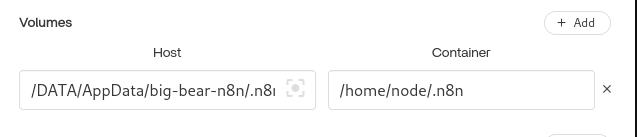
(example from n8n, Nextcloud is same situation). This is bind-mount theory, I currently do not use Nextcloud. This GUI dialog can be popup 3 dots on app → Settings.
You can add as many couples You need, see top right corner- button +Add.