Restore immich bigbearCasaOS

Hello, I need your help with restoring the immich database.

Like many people, I had a glitch in CasaOS due to a Docker update.
I spent the whole day trying to repair and restore the system, and managed to get everything back to normal on a clean system. It’s time to restore Immich - I’m asking for your help, the instructions on the off-site say that you need to enter the following command to restore:

docker compose down -v # CAUTION! Deletes all Immich data to start from scratch
## Uncomment the next line and replace DB_DATA_LOCATION with your Postgres path to permanently reset the Postgres database
# rm -rf DB_DATA_LOCATION # CAUTION! Deletes all Immich data to start from scratch
docker compose pull # Update to latest version of Immich (if desired)
docker compose create # Create Docker containers for Immich apps without running them
docker start immich_postgres # Start Postgres server
sleep 10 # Wait for Postgres server to start up
# Check the database user if you deviated from the default
# Replace <DB_USERNAME> with the database username - usually postgres unless you have changed it.
gunzip --stdout "/path/to/backup/dump.sql.gz" \
| sed "s/SELECT pg_catalog.set_config('search_path', '', false);/SELECT pg_catalog.set_config('search_path', 'public, pg_catalog', true);/g" \
| docker exec -i immich_postgres psql --dbname=postgres --username=<DB_USERNAME> # Restore Backup
docker compose up -d # Start remainder of Immich apps

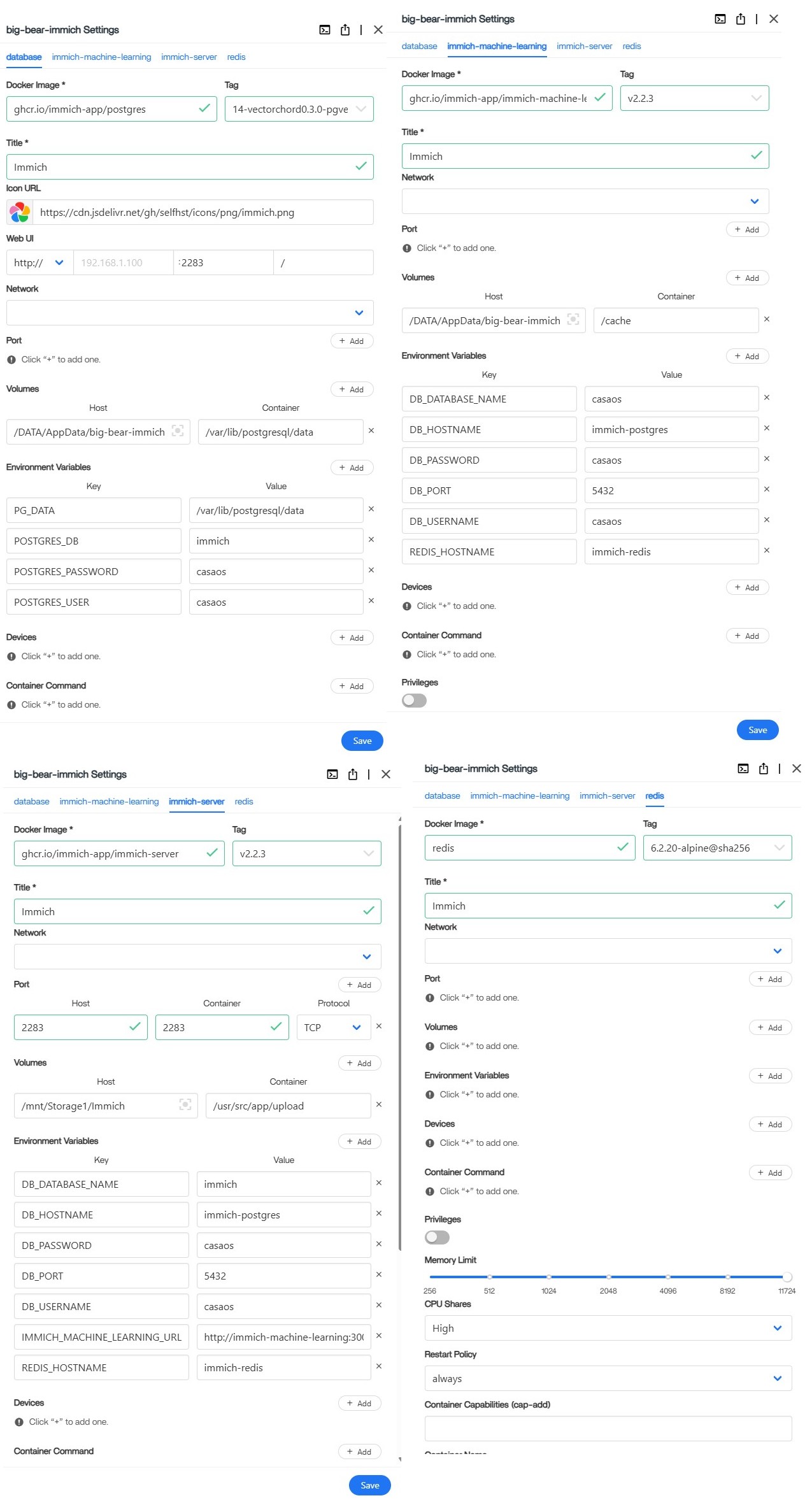
I have installed a clean version of immich from BigBearCasaOS, please tell me what is the correct code to specify to restore the immich database my path for the DB file is: /mnt/Storage1/Immich/immich-db-backup-20251120T182118-v2.2.2-pg14.19.sql.gz all other parameters are standard for installing Immich from BigBearCasaOS
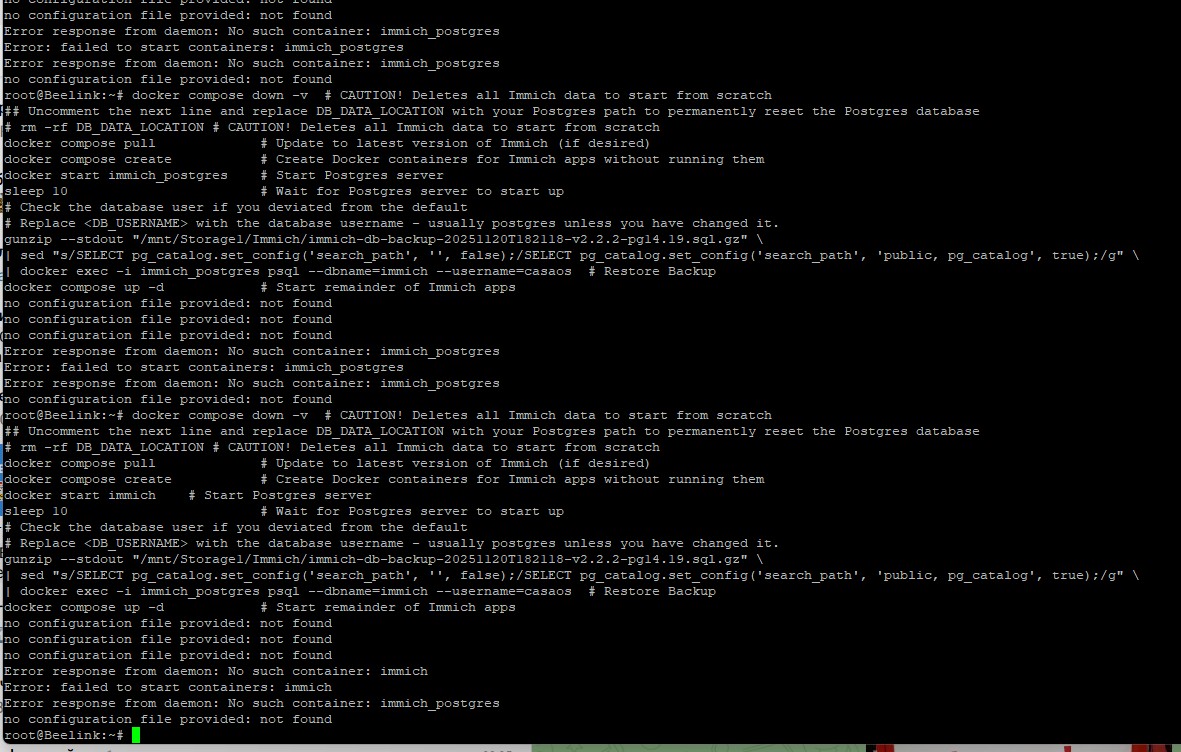
but unfortunately, I can’t restore my database in any way, I keep getting an error when running the command although I substituted the correct username and tried to select other parameters.

what am I doing wrong and what command should I enter to restore the backup?
Hi @Ernest_Kobecz and welcome here!

I hope You are near finish. But there are some thing to You must understand and try.

Depends on docker version/pkg manager install method, sometimes You find in tutorial “docker compose” and sometimes “docker-compose”.

“docker-compose” is older (v1). Goes with pip/pkg mgmt install method.

“docker compose” is newest (v2). y 2001+ You can install directly from developers.

No configuration file provided: not found

is msg related that in Your current folder, docker itself cannot find docker-compose.yml

So, when You call docker up, docker do not know what are You trying to do.

SOLUTION

Solution is simply.

A) go to folder, where stay docker-compose.yml: cd /var/lib/casaos/apps/big-bear-immich

and call docker compose up command here.

OR

B) specify path, where you yml file stay:

docker-compose -f /var/lib/casaos/apps/big-bear-immich/docker-compose.yml …

So I guess whole is:

gunzip --stdout “/mnt/Storage1/Immich/immich-db-backup-20251120T182118-v2.2.2-pg14.19.sql.gz“
| sed “s/SELECT pg_catalog.set_config(‘search_path’, ‘’, false);/SELECT pg_catalog.set_config(‘search_path’, ‘public, pg_catalog’, true);/g”
| docker exec -i big-bear-immich psql --dbname=immich --username=casaos
docker compose up -d -f /var/lib/casaos/apps/big-bear-immich/docker-compose.yml

See different -i immich-postgress is docker container name in docs of immich. ZimaOS/CasaOS use different name. You can simply explore name of containers on Host this way:

sudo docker ps

Last column is NAMES, which is name of containers.

What is good to know

App’s data are stored in: /DATA/AppData/big-bear-immich

But docker-compose.yml file is located here:

/var/lib/casaos/apps/big-bear-immich

Hi!

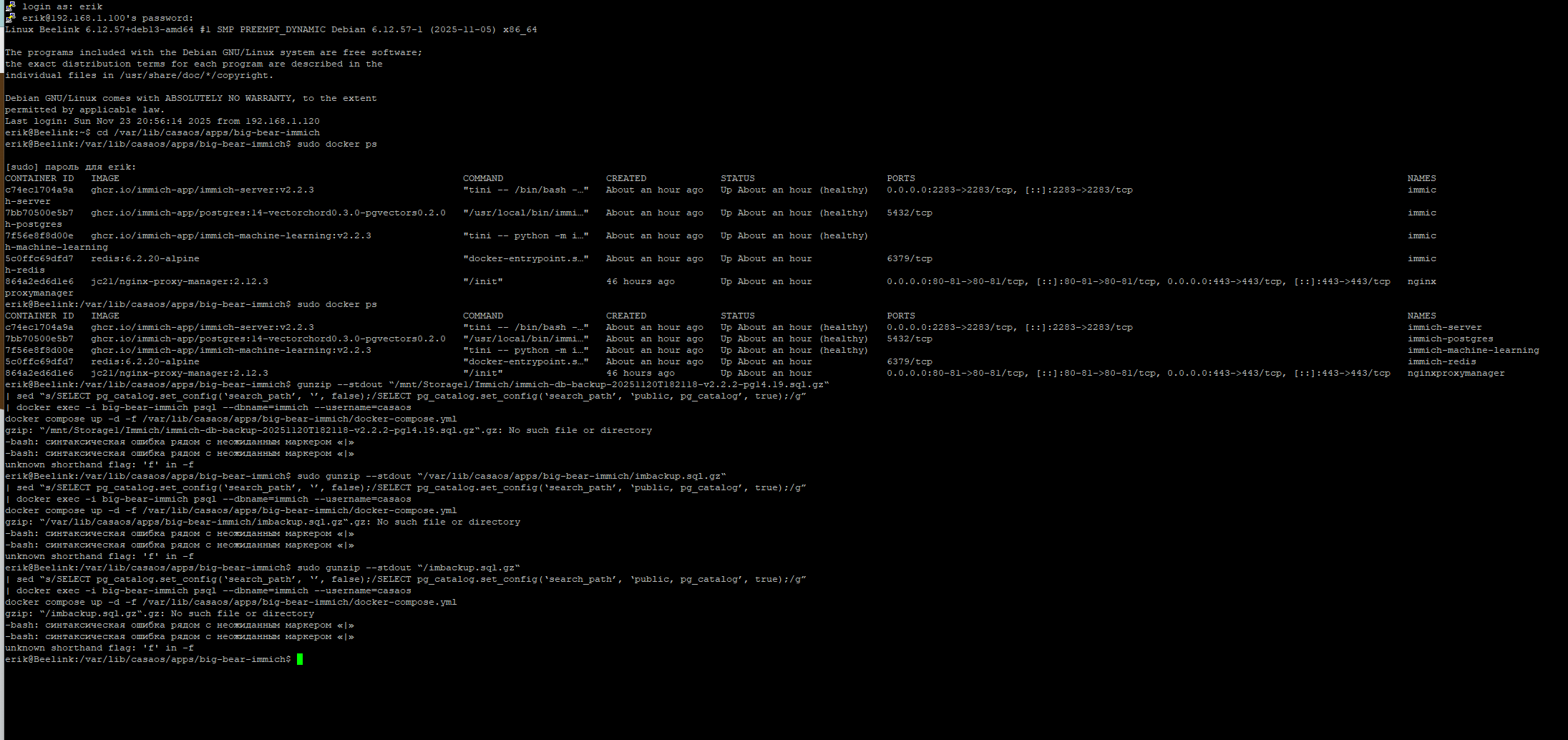
Thanks for the help, but unfortunately it didn’t work out for me ( Every time I had problems, I tried to change variables, changed the path to the file (of course, I moved the file there too) but I kept getting errors like this:

The backup file is currently here: /var/lib/casaos/apps/big-bear-immich/imbackup.sql.gz

I have a completely clean CasaOS system and a fresh installation Immich by BigBearCasaOS.

All screenshots of the settings can be found in my previous message in this thread.
I am desperate for help - can you please tell me what command I need to enter in the terminal to restore my database? I have been struggling for days and I am hoping for your assistance.

Hi.

First

My advice was with docker exec -i big-bear-immich psql

but, when You type output of sudo docker ps

I can see (last column NAMES) Your container has name immich- postgres

So my advice here was wrong. I check it in public github repo, and yes, immich-postgres is OK name. Sorry for this my mistake here!

Second

I am not familiar with Your national character set. If You use " or “. It is very important for running command captured CTRL+C from Internet webpage.

Your first black screenshot display: "

But Your second black screenshot display: “

Same for apostrophe! Use correct for Your setup.

Third

-f argument in docker compose can be use before main sub-command “up”, “down”, etc.

So once again I am sorry for my mistake here.

Good must be:

sudo docker compose -f path/docker-compose.yml up -d

Fourth

Your command:

sudo gunzip --stdout "/imbackup.sql.gz"

is Your typo. You stay in correct folder path and want to use imbackup.sql.gz, so must use: ./imbackup.sql.gz So typo is missed char . (dot)

Small advice: every time when You get msg about unknown path, just try same path as list:

ls path

It can easy discover typo.

I hope it is end of this unfortunate bugs. Good luck!

I found where “ was appeared- this forum automatically format " to “

Sorry, Now I know, that I must be careful for that here in forum :slight_smile: